
Amazon ASIN Enricher - Add ISRC, Track and Release information to your Amazon sales files
Since the fall of 2026, Amazon has changed how they share royalty statements with labels and distributors. These files are now no longer available via FTP, but can now instead be downloaded through Amazon's Music Central. These "detail usage" files are now in one uniform excel format, across three separate Amazon Prime, Amazon Unlimited and Amazon Free files.
One caveat around these sales files is that by default they do not include track or release information. So vital information such as the ISRCs, Barcodes, Track Titles and Artists is not included in these files. Instead, only an ASIN code (an internal Amazon code assigned to each product) is provided, in addition to a separate Track Metadata file.
Curve has built a tool which will automatically enrich your detail usage files, so that these files to include ISRC, Barcode, Title and Artist information. These enriched files can then be ingested straight into Curve as a sales file, and thanks to this enriched data it should nicely map against your Tracks and Releases accordingly.
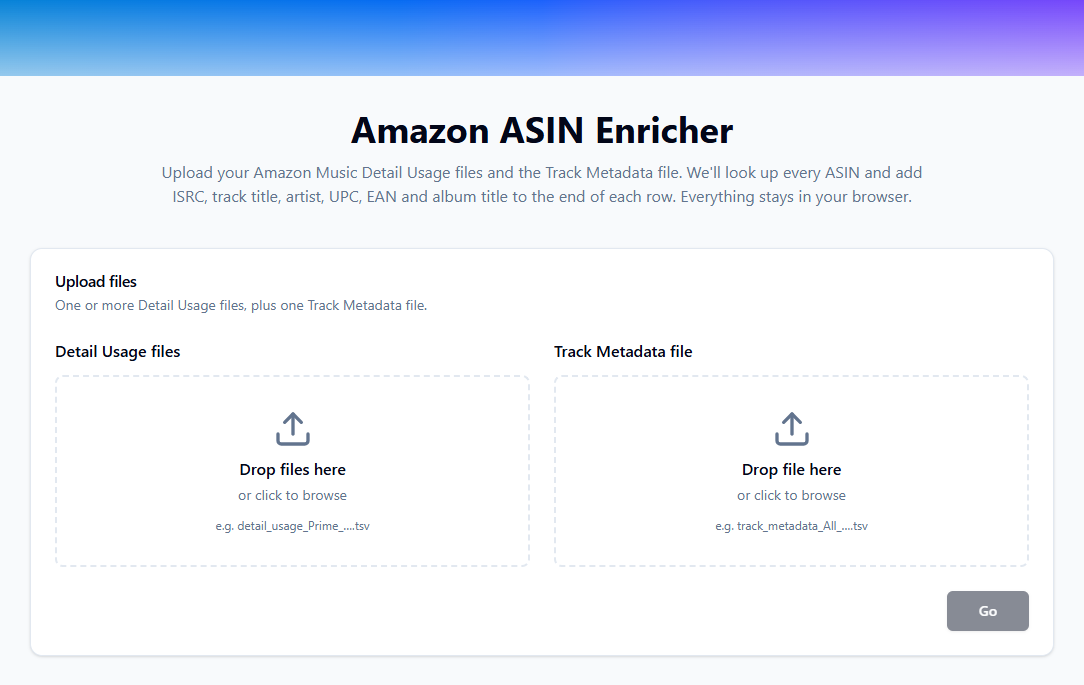
The tool can be found here: https://tools.curveroyaltysystems.com/amazon-enricher/
To use this tool, simply
- 1) Drop your Detail Usage files into the left column. You can drop multiple files at once.
- 2) Drop your Track Metadata file into the right column.
- 3) Hit Go and review the outcome. The tool will validate with you whether all ASIN codes were enriched, or whether some data is missing from the Track Metadata file.
- 4) Download your enriched Amazon sales files
- 5) Upload your enriched Amazon sales files to Curve
 English
 Nederlands