
Berekeningen gebruiken om uw Net Amount, Gross Amount of Per Unit Rate aan te passen
Occasionally, the Net Amount, Gross Amount, or Per Unit Rate in your sales file will need to be adjusted to apply a distribution fee or other change necessary to meet the terms of your agreements with your artists. We can apply these calculations on the Calculation tab of a sales template. In the example below, we will apply a distribution fee to our sales. We can create a new calculation by clicking the + Calculation button. In the Conditions section of the calculation, we can establish the conditions under which the calculations should be applied. The calculation can be applied "Always," when "Any One of the Below" specified conditions apply, or when "All of the Below" conditions apply.
In the Calculation & Output section, we can establish exactly what calculation should occur. In the Output Field drop-down list, we can select the Output Field we would like our calculation to produce. If we are looking to apply a distribution fee to a Gross Amount and store this as our Net Amount, we should select "Net Amount" here. Next, we specify the Calculation we would like to use to apply our distribution fee. If we want to apply a distribution fee of 1.5% to our Gross Amount, choose "Multiplied By" and enter 0.985 as the Value. This calculation will take the number that we have designated as the Gross Amount for each line and multiply it by 0.985, then apply the resulting output as our Net Amount.
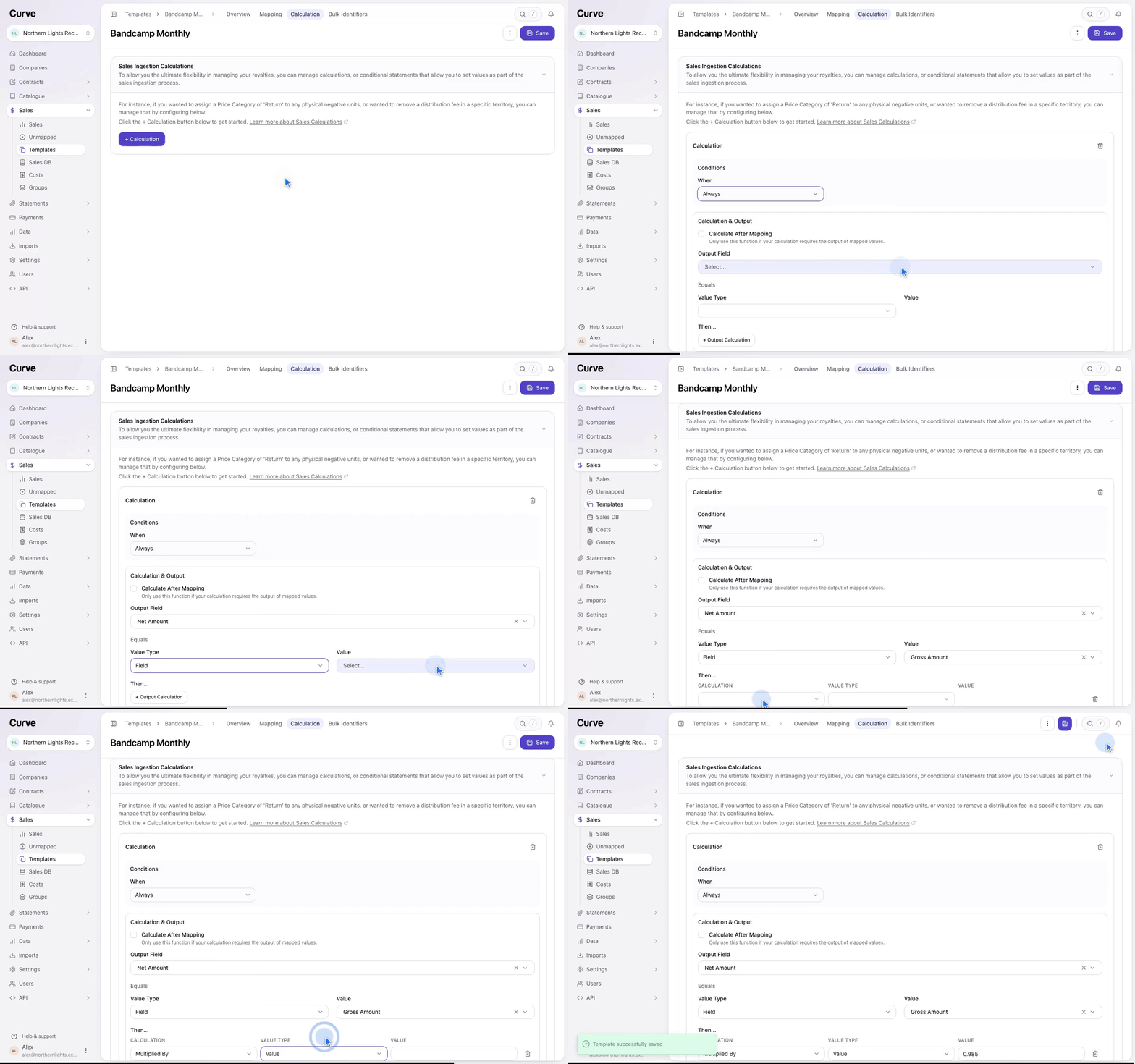
We kunnen berekeningen gebruiken om allerlei manipulaties op regelniveau op onze verkoopgegevens toe te passen. Dit is slechts één voorbeeld van de vele berekeningen die we kunnen uitvoeren om onze verkoopgegevens bij het importeren te bewerken.
 Nederlands
 English