
Ophalen van Return Units en Return Amounts
Soms ontvangt u sales files waarbij de bron verkopen en retouren op dezelfde regel vermeldt. Neem bijvoorbeeld de onderstaande sales regel. De bron had 5 verkopen voor deze release, en 1 retour. U verdiende £10 aan inkomsten, maar had ook £2 aan retouren.

Op Curve kunt u uw Template zo instellen dat de verkopen en retouren afzonderlijk worden opgepikt door gebruik te maken van de velden Return Units, Return Gross Amount en Return Net Amount.

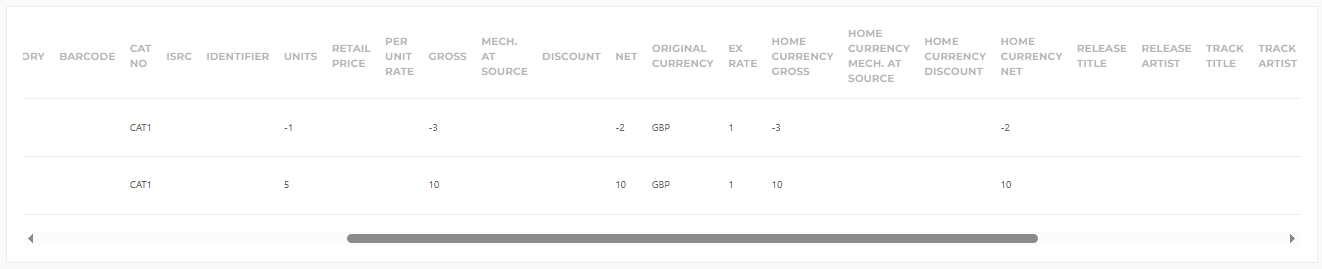
Wanneer dit bestand in Curve wordt ingevoerd, wordt elke rij die zowel verkopen als retouren bevat, gesplitst in twee afzonderlijke sales regels.
De eerste sales regel vertegenwoordigt de verkopen en bevat de Sales Units, Gross Amount en Net Amount precies zoals ze in het bronbestand verschijnen (bijvoorbeeld 5 Units, 10 Gross Amount en 10 Net Amount).
De tweede sales regel vertegenwoordigt de retouren en gebruikt de retourwaarden uit het bronbestand. Deze worden geïmporteerd als negatieve waarden, wat resulteert in -1 Units, -3 Gross Amount en -2 Net Amount in dit voorbeeld.
Hoewel het bronbestand één rij met zowel verkopen als retouren bevat, zullen deze altijd als twee afzonderlijke sales regels in Curve verschijnen.
Bij het ophalen van Return Units, zorg er ook voor dat u een Return Net Amount en Return Gross Amount ophaalt (vooral wanneer u Contracten heeft die royalty's berekenen op basis van Gross Receipts) en vice versa. Deze functionaliteit werkt niet wanneer u er slechts één ophaalt en niet de andere.
 Nederlands
 English