
Setting Up Deliveries to SACEM as an IMPEL Member
If you are an IMPEL member, you will likely be required to deliver your Works to SACEM. When it comes to CWRs, SACEM requires that you add a publishing entity as an Admin for each Work in the file, even if you are the Original Publisher for your shares in the Work.
With this in mind, if you are already successfully delivering Works to SACEM via Curve, then you are already good to go. However, if you are new to deliveries on Curve and you have never delivered to SACEM previously, then there are a few extra steps you'll need to take to get everything set up correctly.
You are just the Original Publisher on the Work
If you have Works where your publishing entity only appears as the Original Publisher in the IP Chain and you do not appear as a Sub-Publisher or Admin, you will need to insert your same Original Publisher entity as an Admin within the SACEM CWRs.
To do this, head to your Publishers page and create a new one.
- Enter a name similar to your actual Original Publisher's name but add " (SACEM/IMPEL)" at the end. This will serve as a handy reference whilst completing a later step.
- In the "CWR Name" field, enter your actual Original Publisher's name so that it is identical. This will make it appear in the exact same way as the actual Original Publisher in your SACEM CWR files, except it will appear on top of the Original Publisher as an Admin instead.
- You can leave the "CAE Number" and "Society" sections blank. Curve will only save the new Publisher if the CAE number is unique or blank so we need to add the actual CAE number elsewhere.
- Make sure this new Publisher is ticked as Controlled.
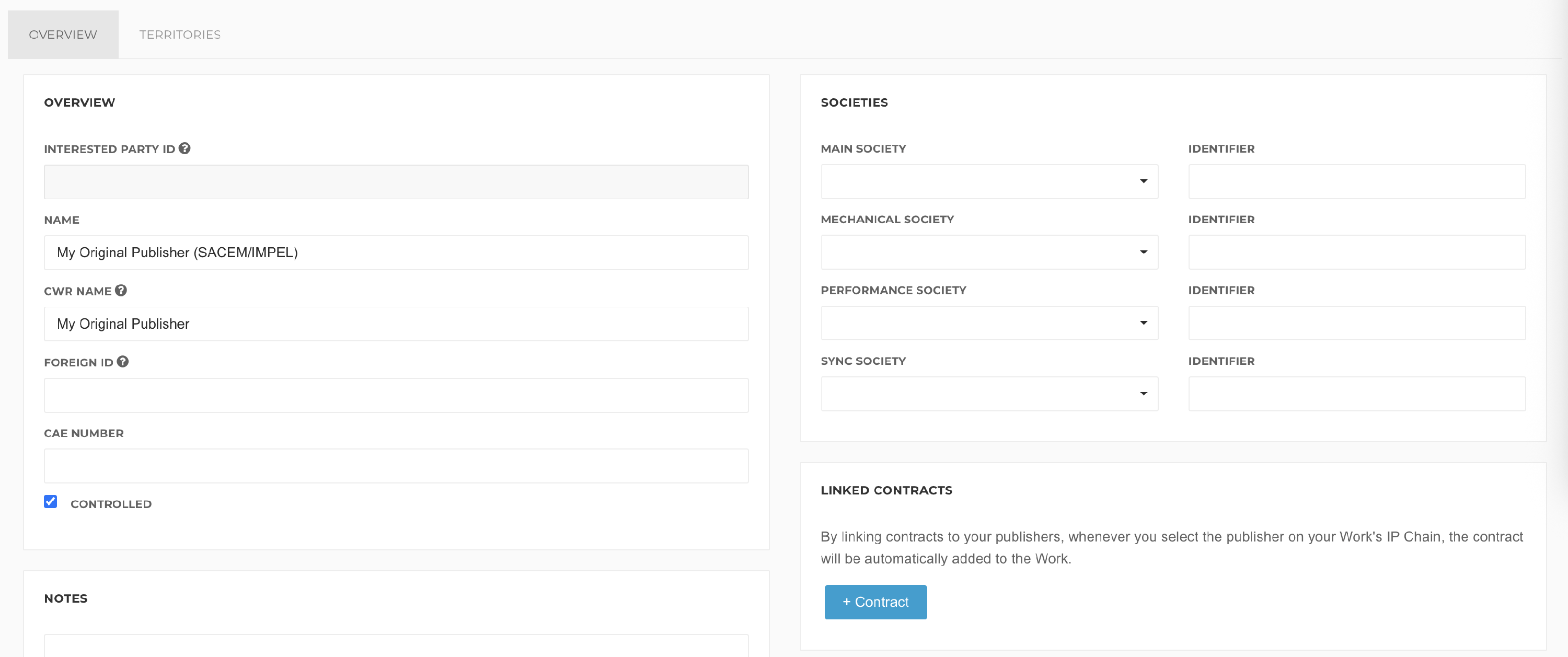
Next, scroll down to the Identifiers section. This is where we can enter the Publisher's real CAE number and also specify it as a SACEM member:
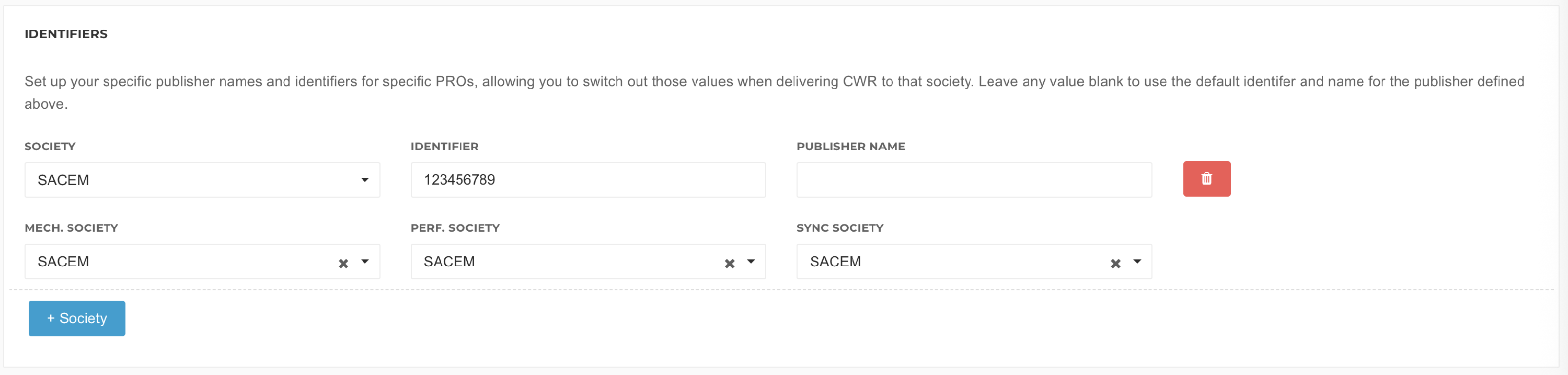
Here, we are saying that only when this Publisher is included in a Delivery to SACEM (Society), change the CAE number from "[blank]" to "123456789" (Identifier); keep the Publisher Name the same ("My Original Publisher"); and enter this Publisher as a SACEM member (Mech./Perf./Sync Society).
For SACEM Deliveries, you should already be set up with a SACEM agreement number to reference in your SACEM CWRs. The agreement number will need to be associated with your new pretend "SACEM/IMPEL" Publisher as the Admin and your actual Original Publisher used in your Works' IP Chains.
Go back to your Publishers page, find your actual Original Publisher (not the new "SACEM/IMPEL" one you have just created) and add the agreement number in the Publisher's "Sub-Publishing Agreements" section at the bottom. Make sure to reference the new "SACEM/IMPEL" Publisher in the Publisher field.

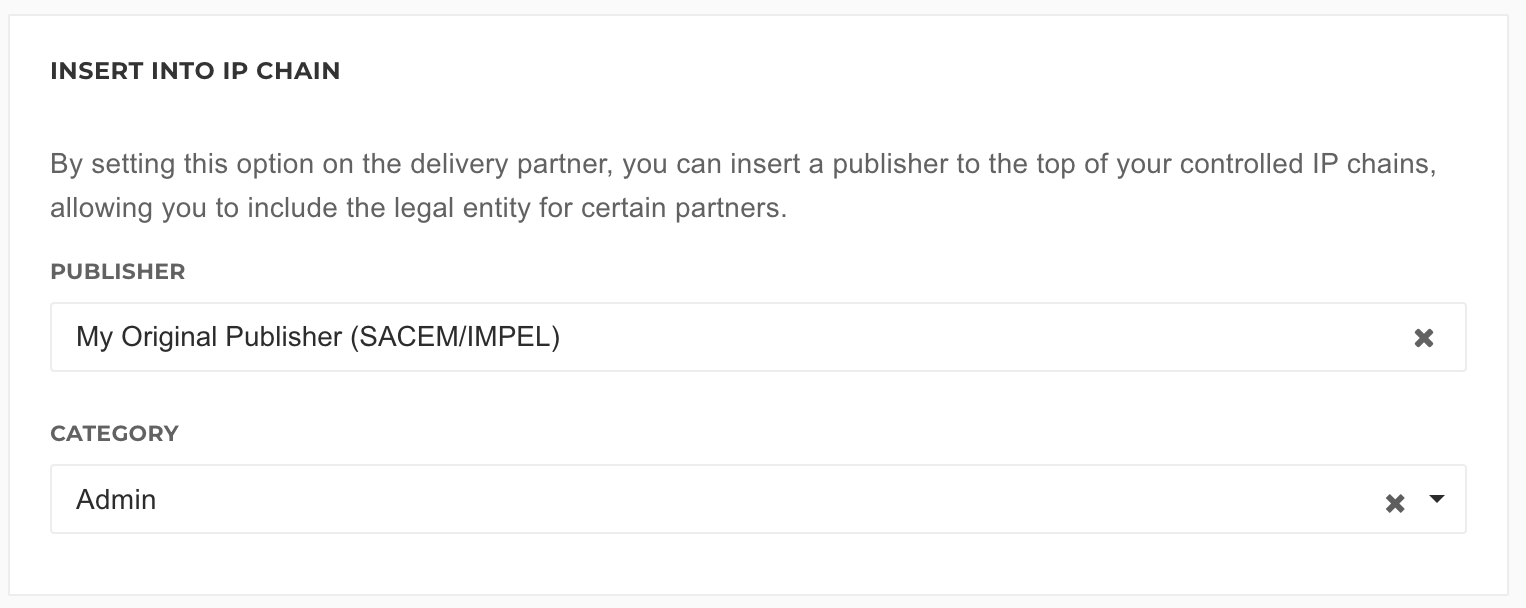
We now need to create a Delivery Partner for delivering SACEM/IMPEL and insert this new "SACEM/IMPEL" Publisher for any Deliveries made using this partner.
After completing the Overview section for the Delivery Partner, scroll down to the "Insert Into IP Chain" section and enter the new "SACEM/IMPEL" Publisher as an Admin.
You are now ready to create a Delivery! First time? Please see our Getting Started with Sending (CWR) Deliveries ✪ article. We also recommend that you also export the CWR first and open it with a text-reading software to check that the SPU lines in the CWR are displaying correctly:

- The names of both Publisher should be identical.
- The first one appears as with "E" which means it is an Original Publisher; the second should be "AM" for Admin.
- Both CAE numbers should be identical.
- The first "E" Publisher should have its original CISAC membership code (in this case it is "052" for PRS); the second "AM" Publisher should have "058" which is SACEM's CISAC membership code.
- The second "AM" Publisher should have the SACEM agreement number next to it towards the right ("654321").
You are the Sub-Publisher/Admin on the Work
You may also sub-publish some Works on behalf of an Original Publisher. For this scenario, you can follow the same steps as above and use the same SACEM/IMPEL Delivery Partner except you will need to complete one additional step before sending a Delivery.
On your Publishers page, find your Sub-Publisher used in the Works and enter the appropriate SACEM agreement number into the "Sub-Publisher Agreements" section and in the "Publisher" field, enter the same entity you used for your Original Publisher setup above.

When you go to create a Delivery, export and open the CWR file again to check.

- Your Original Publisher and Sub-Publisher should be displaying as normal, with their usual CAE numbers and memberships.
- There should be a third "AM" (Admin) Publisher at the bottom with the same membership details as the "SACEM/IMPEL" entity used in the "You are just the Original Publisher on the Work" steps above.
- The SACEM agreement number should be on the same line as your third "AM" Publisher towards the right.
 English
 Nederlands